Wednesday, November 17, 2021

Test Analytics with AI-Based Automation


What are software testing metrics?

As a project manager if you want to know how productive your team is. The answer “very productive” sounds good, but not enough to satisfy the higher management and business unit owners. They want to see the numbers to substantiate these claims.

Similarly, when asked about project progress, the answer “as per the schedule” is not the right answer when it comes to presenting it to the people who matter, i.e. customers. They want to see some tangible progress on board.

“What about the health of the project?” — “Very few defects here and there” will not cut it. Where are the numbers?

That is where software testing metrics step in.

Software testing metrics are quantifiable measures that help the business and technical stakeholders to determine a software project’s progress, quality, and people/process efficiency.

But, throwing in just some random numbers won’t help your cause unless they are in strong context with the project under development. It is important to consider the type of project, requirements, timelines, budget, and of course the quality process too before defining the metrics.

Webomates is the API automation platform that enables companies to load, monitor and automate web APIs. These APIs may be public or private and can be used to control connected devices, integrate SaaS solutions, and drive business processes.

Types of software metrics

Software metrics can be broadly classified into 3 categories.

Project Metrics: These metrics help in evaluating project status, estimating variance in schedule/cost, assessing productivity, and quantifying defects to measure the project’s health.

Product Metrics: These metrics are based on product specifics like size, complexity, performance, etc. These are measured at different stages throughout the software development to ensure that the product is being developed as per the requirements.

Process Metrics: These are used to measure the efficiency of the software testing process based on the net outcome in terms of defect-related numbers within the specified timeline and budget. These numbers help in optimizing the process further for improved results.

For every metric type usually, there is a base metric and derived/calculated metric. Base metrics are specified during test planning and derived metrics are calculated by applying specific formulas.

The need for software testing metrics

Software testing metrics answer the questions that aid the managers, customers, decision-makers, and technical teams in making informed decisions about their projects.

MetricsWhat they tell youROI on testing

  • Did we overshoot the budget?
  • Did we estimate the effort and skills correctly?

Time management

  • Was the time earmarked for testing too little or extra?
  • How time/efforts can be managed better to improve feature velocity
  • Will the product be delivered on time?

Defect management

  • How many defects were discovered?
  • Were they fixed or deferred?
  • Severity of defects

Test result analysis

  • Was the testing effective?
  • Was the test planning efficient?
  • Is the product adhering to specified quality standards?

These are just a few examples, but when you sit down and start listing down the metrics, more questions will arise, that will get your think tank working to start deriving metrics pertinent to your software. Some metrics are relevant to the internal development and process teams, while some act as project health indicators for the management, and some act as flags for the customers.

Importance of software testing metrics (How they make QA process more effective)

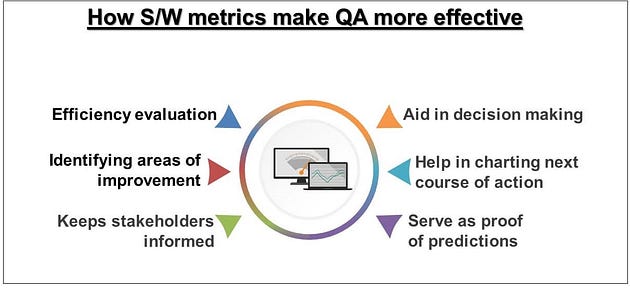
Software metrics are the definite numbers that help the business/technical stakeholders to understand the efficacy of their process, monitor critical operations, evaluate the outcome of QAOps and then charter the future course of action based on the findings.

Let us understand how these metrics make the QA process more effective.

Efficiency evaluation:
The software metrics help you in understanding whether you were right about the budget or estimating the time based on the quantum and complexity of work. They also help you in evaluating the effectiveness of test planning and execution.

Identifying areas of improvement:
Do you want to understand the testing and patterns that emerge from the results? Software testing metrics are there to help you. They provide insights into software behavior and help the teams to observe and evaluate defect patterns, defect density, defect distribution

Keeps stakeholders informed:
No need for the managers and the customers to worry about slipped timelines or overshooting the estimates, because the metrics keep them all apprised about the project progress and quality

Help in decision making:
Now that all the concerned parties are equipped with the knowledge of quantifiable measures, it becomes much easier to make decisions about the project and optimization of process and resources.

Help in charting the next course of action:
With timely decisions made, it becomes even easier to plan for future work strategies.

Serves as proof for predictions:
Didn’t you set certain estimates at the outset of the project? These metrics will help in proving you right or wrong w.r.t. time, effort, cost, skill, etc.

Few useful metrics for test analytics

Let’s face the fact that it is a herculean task to track and measure every parameter during software development. Hence it is wise to identify the metrics that align with your business priorities, and they need to be analyzed and revisited from time to time. A few thumb rules that you need to follow for metrics independent of business are that they should be easy to understand, use consistent measurement units, adaptable, reliable, and accurate. This section will list down a few common metrics used in software development for you. Read More about : Api automation

Tags: AI test automation, AI Testing, Software testing metrics, Test Automation, Testing metrics

Tuesday, November 16, 2021

Is GraphQL the next big thing?


Background

In the world of internet-driven information consumption, sluggish, and non-contextual internet response on requested information is a huge mood swinger. To solve this problem in web and mobile applications, in 2012, Facebook invented an alternative to the long prevalent REST API and called it GraphQL. GraphQL is a data query language that increases developer productivity and reduces the amount of data transferred in the API requests. After proving this advantage, Facebook open-sourced it in 2015 and since then it has been used by many companies like Github, New York Times, PayPal in application development.

Advantages of GraphQL

  1. Universal data translation
    GraphQL has a huge positive implication on the developer community as a whole, because it removes errors between applications and servers, and helps incomplete data translation between various applications. This removes the bottleneck and pressure on the end application developers to ensure compatibility. Close to 100%, GraphQL requires an organized schema which in itself becomes a document.
  2. Schema-based data definition
    Once the schema is defined, GraphQL considers it as a model with all the properties. It does not require to specify data requirements at the server-side and hence based on the schema data definition happens on the client-side. Thus, prototyping becomes much faster. This is apparent from the fact that emerging product companies are relying on GraphQL.
  3. Rapid product development
    GraphQL is a boon to front end developers. The GraphQL libraries allow for realtime updates on the UI without touching the backend and therefore, iterations on app development are fast. Without GraphQL, it would have required longer than usual and an entire team to deliver the same. GraphQL facilitates schema driven development which means features are designed as per the schema created on the server. GraphQL APIs can be stitched together and therefore a single API can be developed from an existing API. This reduces the complexity to deal with multiple endpoints. Schema stitching also makes the API re-usable, thereby shortening the product development time.
  4. Enhance backend stability
    Stability comes from the simplicity with which GraphQL structures the data, independent of the client requests. GraphQL acts like a translatable layer between the client and the server which directs the server data requests to the necessary resources and systems. This allows modifications in the application backend, without restructuring the client. Since the data is passed in the language path itself, the query looks simple and elegant. Stability is further achieved because GraphQL defines the shape of the objects returned by the API.
  5. Improved query efficiency
    GraphQL gives the application developer a single entry point for multiple queries instead of multiple or ad hoc endpoints and complex data retrievals. The data is defined in a schema on the server, it is delivered in a single predictable package rather than differentiated packets. The software developers don’t have to rely on the REST endpoints which return pre-defined and fixed data structures. Pre-defined data structures lead to either getting more information than needed, called over fetching, or getting less information than needed, called under fetching, in a single query. Underfetching and Overfetching are two commonly observed problems in the REST APIs. Schema-based data on the server, adds predictability to the APIs output.
    GraphQL decreases the number of resources required in each data query. Servers are able to publish contextual output in the APIs and the client can request the data with simple data calls. This means the application developers can implement data restrictions naturally with minimal impact on consumers. GraphQL improves queuing efficiency as it adds specificity and predictability in the output which improves the product development speed. This type of query output also reduces the load on the backend, which need not be modified every time there is an iteration in the product development. Read More about : Api automation testing

Tags: API Testing, Postman, REST API, Swagger

Monday, November 8, 2021

Do’s and Don’ts of API Testing

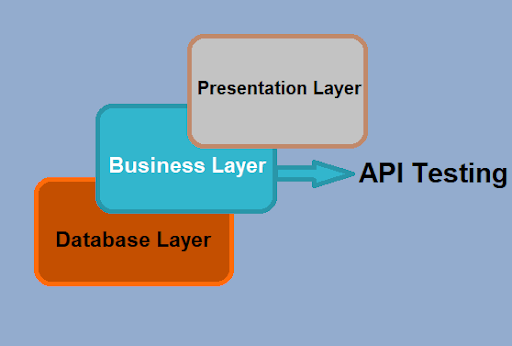
 API testing is a critical component of the whole testing process. It deals with testing the business logic of an application, which is typically encompassed in the business layer and is instrumental in handling all the transactions between user interface and underlying data. It is deemed as a part of Integration testing that involves verification of functionality, performance and robustness of API’s.

API’s evolve and develop as and when business and functional requirements change, thus making it even more important to test them on a continuous basis. They also become suitable candidates for automation testing since they need to be tested with every release cycle. Besides checking for the functionality API testing tests for error condition handling, response handling in terms of time and data, performance issues, security issues etc. It is quite evident that API testing is the key to testing the business requirements, thus it is imperative to follow certain best practices in order to achieve good outcome.

Following table gives a quick overview of what to do and what not to do while conducting API testing. These points are further elaborated in entailing paragraphs.

Do’sDon’tsCategorize the test casesUse static data Prioritize API callsIgnore dependenciesAutomateMiss including response time assertionsChoose suitable automation toolTake security testing slightly positive and Negative testing ignores one time call functions share test results Keeping documentation on low priority reform load tests

What to do for successful API Testing

  • Categorize the test cases

An application may involve several APIs which may sometimes run into triple digits. In order to maintain the test cases for quick reference and execution, it is a good idea to categorize them.

  • Prioritize the API calls

Calls made to API’s should be prioritized for ease of testing.

  • Automate the API testing process

API tests are usually deemed stable and major changes are done mainly when business logic is changed. This makes them perfect candidates for test automation. Since API testing is a type of Black-box testing different combinations of inputs can be used to test a scenario, making this a Data driven test approach. The test data, scripts and API endpoints can be saved for execution at a later stage.

  • Choose a suitable Automation Testing Tool

There are several tools, like Parasoft SOATest, POSTMAN, RestAssured, JMeter, Swagger, API Fortress etc that are available in the market for API testing. Choose a suitable tool carefully to leverage the benefits of automation.

  • Create positive and negative tests

For a complete scenario check API testing requires to run both, positive and negative tests. Since API testing is a data driven approach, various combinations of data inputs can be used to test these. In either case, proper care must be taken to ensure that API returns appropriate response to the calling function.

  • Share the test results

API testing failure should be brought to the attention of all the stakeholders involved on a priority basis. Even better approach would be to send out immediate notifications using team notification channels in event of any failure. This will help the team in taking prompt action.

  • Perform Load Tests

An API should handle load tests either by functioning as expected or failing gracefully in a predictable manner. It should be able to handle a variety of input data and manage error conditions, in case of failure.

What to avoid during API Testing

Following points should be taken care of while performing API testing.

  • Using static data

In a real life scenario, API endpoints rely on inputs from calling code or on the outputs of other API’s. Using static data embedded in code or otherwise will yield incorrect results when the API is called in the live environment. It is prudent to perform a proper Integration testing of API’s by following actual user and data flows.

  • Ignore dependencies

API’s often depend on other API’s and sometimes on external services also. It is vital to test the third party API’s in test environment and then test the dependent API along with those API’s to have a holistic picture. In a nutshell, the whole ecosystem needs to be tested in order to ensure that any changes/upgrades in other API’s does not impact the functioning of dependent API’s.

  • Missing the response time assertions

It is important to keep track of the response time of API calls. While a test may pass functionally, there could be a number of reasons for delayed response. This affects the end user experience. Any application which takes too long to compute or load or give results is not what the end user wishes to use. Hence, it is a good practice to include a time based test to check the response time. If API is taking too long to respond then it should be reported so that the developers can look into the code to understand the delayed response.Click here to read more: Api Automation

Tags: API Testing, Postman, REST API, Swagger

Thursday, November 4, 2021

Top 5 Traps to Avoid in API Testing

 API testing involves testing of application programming interfaces (APIs) directly and as part of integration testing to determine if they meet expectations for functionality, reliability, performance, and security. 

API testing deals with verifying and validating the business logic of an application, which is typically encompassed in the business layer and is instrumental in handling all the transactions between the user interface and underlying data. Additionally, it also deals with contract testing i.e. verifying the compatibility and interactions between various services. The contract is between a client/consumer and an API/service provider. 

Testing APIs is a task not to be taken lightly since they can span multiple applications and are also used for third party integrations. Our article here identifies the top 5 common mistakes that people tend to commit while testing APIs.

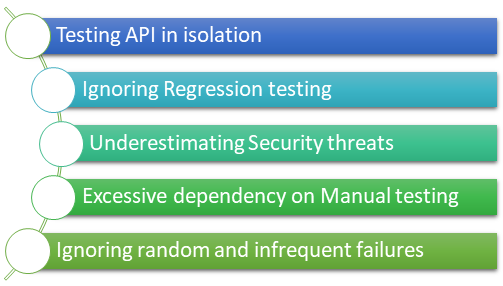
Top 5 API testing mistakes

Top 5 API testing mistakes

Testing API in isolation

Testing API in isolation

API testing without considering interacting modules/plugins, data input/output, and the environment is a big folly that can lead to a potential disaster. APIs often depend on other APIs and sometimes on external services also. It is vital to test the third-party APIs in a test environment and then test the dependent API along with those APIs to have a holistic picture. In a nutshell, the whole ecosystem needs to be tested in order to ensure that any changes/upgrades in other APIs do not impact the functioning of dependent APIs. Ideally, the whole workflow should be checked multiple times with a variety of inputs to cover all possibilities.

Ignoring regression testing

Ignoring regression testing

Not performing regression testing enough on APIs can prove to be the single biggest failure point. 

APIs keep evolving as and when the functional requirements evolve and change. Any minor change should be tested thoroughly. 

It is wrong to assume that minor changes will not have a major impact on the functioning of the API and other dependent modules/API.

Underestimating security threats

Underestimating security threats

APIs like any other code are susceptible to external threats and attacks. It becomes even more imperative to conduct security tests when a third-party free/paid API is used. Hence, it is important to conduct a vulnerability scan for known threats and determine the security posture of the API. This further aids in identifying and plugging any possible gateways to potential breaches.

Excessive dependency on manual testing

Excessive dependency on manual testing

Testing APIs manually is a time-consuming process and some bugs may inadvertently escape the test net. It is a good practice to automate API tests since APIs are fairly stable unless the business logic changes. Also, API automation is a type of Black-box testing and different combinations of inputs can be used to test a scenario. The test data, scripts, and API endpoints can be saved for execution at a later stage.

Ignoring random and infrequent failures

Ignoring random and infrequent failures

There may be times when an error is not replicated, but that certainly does not mean that it cannot occur again. For all we know, that small random error snowballs into a major issue later when the application runs in its entirety. A wiser approach is to keep tabs on all errors and keep drawing the scenarios that caused them.

API testing services offered by Webomates-CQ

API has taken a center stage with new initiatives being undertaken in various fields. The rise of service-oriented architecture has rendered flexibility and adaptability to the applications in expanding their reach by introducing a variety of microservices to the end-user. Clearly, API’s usage is not limited to just one application. Hence, developing and testing them thoroughly is extremely critical.

Webomates has employed a distinct approach to test APIs using Manual and Automation testing. We provide API testing services that focus on Performance and Security Testing to make sure the application is secure and gives the application a strong backbone. Contact us at info@webomates.com to know more about API testing services that we offer.

You can take a quick look at the following table to see which tools are already integrated into our Testing as a Service platform. Click here to read more: Api Automation


Tags: , , , , API Automation


Why Do Test Automation Challenges Slow Down Software Testing?

  Software testing is an essential part of delivering reliable and high-quality applications. As development cycles become shorter, QA teams...