Webomates provides a cloud-based AI software testing as a service platform to carry out software functional testing in guaranteed timeframes. The platform creates test cases & scripts and executes them using multiple testing execution techniques like AI Automation, Automation, Crowdsource & AI enhanced manual. At the end of the execution what you get is the actionable triaged defects. Every execution result is recorded and auditable from the CQ portal.
Showing posts with label Test Automation. Show all posts
Showing posts with label Test Automation. Show all posts
Generative AI, is the latest buzzword emerging among organizations to enhance productivity and innovation.
Also referred as Generative AI, it expands the capabilities of AI by enabling applications to analyze existing data and create new data that can be in the form of text, images, audio, and video.
It uses ML algorithms to train models to understand patterns and data.
In order to provide a better customer experience, teams are increasingly beginning to use the power of generative AI by integrating ML and AI throughout their technology stack.
As per the Generative AI market report, it is anticipated to soar from a USD 8.65 billion valuation in 2022 to a whopping USD 188.62 billion by 2032.
In this article, we explore the transformative impact of Generative AI on QA cost management.
How Does Generative AI empower QA teams?
For every team, there is always one ongoing challenge: how to ensure comprehensive testing while enhancing the quality assurance (QA) capabilities.
Traditional AI systems are programmed to perform specific tasks. Generative ai in software testing relies on models and algorithms that pick up patterns from vast amounts of datasets, and then generate new content and make new predictions.
Technology is the primary force behind any transformation. And the role of testing is changing, moving from being overlooked to becoming a value creator. In today’s world, it becomes extremely critical for enterprises to adapt to the fast-changing requirements and customer expectations.
Test Automation plays an important role in allowing businesses to boost productivity, develop new products rapidly, and enhance the development and testing process thereby leading to increased customer experience.
Many teams use Open-source platforms for their test automation. Although such platforms offer extensive customization, flexibility, and a broader community ecosystem, it’s essential to recognize the potential bottlenecks associated with them.
Bottlenecks of open source platforms:
Requires a higher degree of proficiency in programming languages and frameworks.
Creating and maintaining tests is time-consuming, especially for complex applications with frequent changes.
Flaky tests along with factors such as synchronization issues, dynamic content, or environmental variations can contribute to the instability of tests.
Open-source tools may require dedicated resources for script development, leading to higher costs.
Scaling test automation efforts with open source tools is challenging especially when the application’s functionalities increase, leading to increased complexity.
Test scripts in open-source tools may lack reusability.
Developers need a lot of hands-on experience with programming languages before they can be productive.
Development of applications takes more time.
Shifting to low code/no code platforms can offer a more accessible and efficient testing process, especially for teams looking to enhance collaboration and accelerate testing cycles.
Transforming the testing landscape with LC/NC platforms
Low-Code platforms, also known as low-code application development platforms, minimize or eliminate the manual coding required to develop and deploy software applications. They have a panel of visual elements that enable development without programming.
No-Code platforms allow people with no knowledge or technical training in software development to create applications without programming a single line of code.
Teams can use Low-Code/No-Code (LCNC) technologies to radically change how work gets done. It can enable teams to automate more tedious, error-prone processes that can occasionally take attention away from more strategic, higher-level work that adds greater value to the company.
According to the Mckinsey report, there will be 70% growth in the market and adoption of new application development that will leverage low-code/no code by 2025 (vs <25% in 2020).
Benefits of Low-Code/ No-Code Platforms
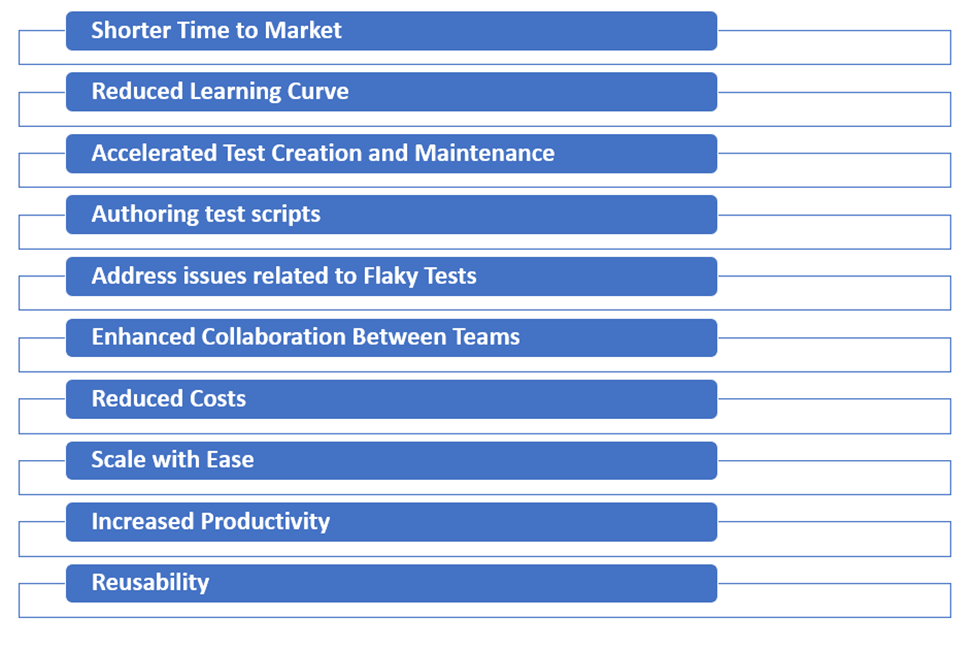
1.Shorter Time to Market
Less time is spent on development using such platforms. With code templates and pre-built features, you can significantly improve your application’s release time, resulting in a shorter time to market for new products. significantly
2.Reduced Learning Curve
It requires minimal coding experience and provides a visual interface and pre-built components making it easy to use. Using a component-based approach enables developers to develop applications without writing any code.
3.Accelerated Test Creation and Maintenance
Creating and maintaining tests is faster due to the drag-and-drop functionality and reusable components. This will ensure testing cycles are much faster compared to traditional test automation.
4.Authoring test scripts
Offers a visual interface and drag-and-drop functionality, reducing the time and effort required to author test cases.
5.Address issues related to Flaky Tests
The LC/NC platforms minimize the reliance on intricate coding and have features for handling dynamic elements and reducing the flaky tests. You can have AI-powered automation with self-healing capability to deal with synchronization issues or dynamic elements.
6.Enhanced Collaboration Between Teams
Quality increases when teams work together. These platforms encourage collaboration by allowing business analysts and testers to contribute to test automation efforts from very early stages, making the development and testing cycles more agile and focused on the end-user experience.
7.Reduced Costs
You can reduce the dependency of developers in creating UI tests. Testers can also contribute to automation, reducing the need for specialized development skills and associated costs of training.
8.Scale with Ease
These tools can handle complex test scenarios and also scale up or down according to the changing needs of the testing process.
9.Increased Productivity
Rather than spending hours coding, developers can be productive by focusing on more important business problems.
10.Reusability
These platforms emphasize on modular designs, allowing developers/testers to create reusable components. You can reuse the test flows across test plans. To know more about this blog : Benefits of low code test automation
Software and applications have become an integral part of every industry. According to Statista Market Insights, “The world software revenue was estimated to be around $659Bn in 2023.”
As good as it sounds, this major surge in software or application requirements has made it difficult for software teams to focus on quality and speed at the same time and this is when AI comes to the rescue. From driving high-performing software solutions to interactive applications, AI plays a very important role in the software development lifecycle.
According to this report from Market Research , the Software Quality Assurance Market is expected to register a CAGR of 9.6% and USD 14.01 billion by 2025. AI is one of the contributing factors to this growth.
This article focuses on how AI is helping developers and testers alike in making the software development process more efficient.
AI Use cases for Developers and Testers
Natural Language Processing for Requirements Analysis
According to an IAG consulting study, “Companies with poor requirements definition and management spend on average $2.24 million more per project on their major projects.”
In an Agile environment, it’s a daunting task to interpret ever changing customer requirements. This is when AI comes to the rescue by processing and analyzing product requirement documents with remarkable accuracy. AI-driven NLP algorithms extract essential information and can present the analysis in desired format, helping the teams comprehend project requirements more efficiently.
Code Review Assistance
Code reviews are crucial for maintaining code quality, but they can be time-consuming, if done manually. AI technology can help with code analysis, identify code quality issues, suggest improvements, and even automate some parts of the review process. This accelerates development cycles while ensuring higher code quality.
CodeScene, one of the top code reviewing tools of 2023 leverages AI to automate the entire process and provides instant feedback as well.
Continuous Integration and Continuous Deployment (CI/CD) Optimization
Efficient CI/CD pipelines are the backbone of modern software development. AI helps with codeless testing, offers better test coverage and also comes with a reliable defect management system. Apart from that it also offers fool proof tracing to debug efficiently.
Automated Test Case Generation
Manual test Case generation for multiple scenarios can be tedious and error-prone. Additionally, test case updation can be very challenging due to changes done to reflect bug fixes and incorporate new requirements. AI-based test automation saves time, increases testing efficiency, and reduces human error.
We at Webomates use generative AI extensively to accelerate our test case creation process thereby reducing efforts significantly. Want to know more? Read our blog “Generative AI is a game changer in Software Testing”
Automated Performance Testing
Performance testing measures, validates and verifies response time, stability, scalability, speed and reliability of a system. AI can automate performance testing, simulating thousands of users and identifying performance bottlenecks. According to Dunn & Bradstreet, 59% of Fortune 500 companies have experienced 1.6 hours of downtime per week at the least. This has affected their revenue and brand reputation as well. Having AI based automated performance testing will prevent such issues and ensure smoother operation.
Security Vulnerability Scanning
Security is paramount in software development. AI can scan code for security vulnerabilities, including common issues like SQL injection or Cross-Site Scripting (XSS). Identifying and mitigating these vulnerabilities early can save both time and money.
Canva, a graphic design platform, has grown rapidly, and being a cloud company, it needed extra protection so that its tool wasn’t compromised, and this is when it deployed AI into its development process. This has helped them prevent some critical malicious attacks.
Predictive Bug Detection
AI can predict potential bugs in code before they become critical issues. By analyzing historical data and code patterns, it alerts developers to areas that may require extra attention. This proactive approach helps in delivering more reliable software.
Anomaly Detection in Production
In production environments, AI shines in detecting anomalies and issues. It monitors real-time data, identifying deviations from the norm and alerting operators when something goes wrong. This proactive monitoring minimizes downtime and enhances system reliability.
Capgeminihas incorporated AI powered Anomaly Detection to identify any kind of deviations in the data logs during the development process.
Predictive Maintenance for Software
As per Webomates insights, “Software maintenance takes up 80% of the efforts and resources of an organization.” This is where self healing steps in. Self healing detects the changes in properties and automatically updates them with new attributes. This way, one can be assured that the designed test cases are functional.
Webomates took a step further and has incorporated our patented technology called AiHealing, which will address these errors without human intervention.
Automated Documentation Generation
Documentation is often an afterthought, but AI can change that. It automates the generation of documentation from code and tests, ensuring that software remains well-documented throughout its lifecycle. This benefits not only developers but also stakeholders and end-users. There are many tools available in the market for generating documentation from code like Docify, Mintlify, Docuwriter.ai and many more.
Conclusion
AI can simplify multiple tasks that are involved in the development lifecycle. Keeping up with the latest advancements is very important to ensure that you are ahead of the game.
If you are interested in transforming the way you have been testing and want to opt for a new, efficient, and faster process! Drop us a line at info@webomates.com.
Test automation, which is the key to continuous testing, is a technique to automate predefined repetitive testing tasks, using various test automation tools and testing scripts. In an increasingly agile world, test automation aids in improving feature velocity and reducing the duration of release cycles.
According to the Markets and Markets report, the global Automation testing market size is expected to grow to USD 49.9 billion by 2026, at a Compound Annual Growth Rate (CAGR) of 19.2% during the forecast period (2021-2026).
But the question is, are the organizations equipped well to handle this growth?
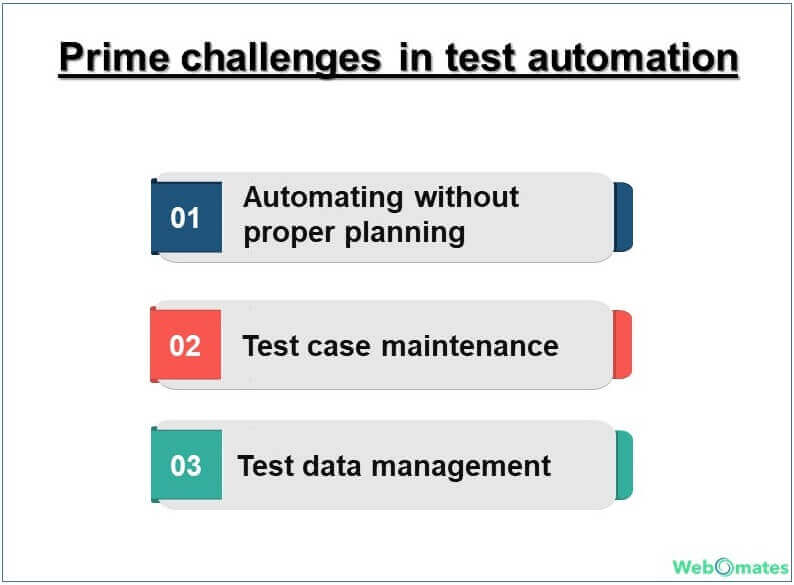
How easy is it to automate the testing process, and make it scalable enough to sustain multiple changes? There are several challenges in automating the test suites. We will be listing the major roadblocks here for a quick glance. For a more detailed account, you can read our blog “Challenges in test automation”.
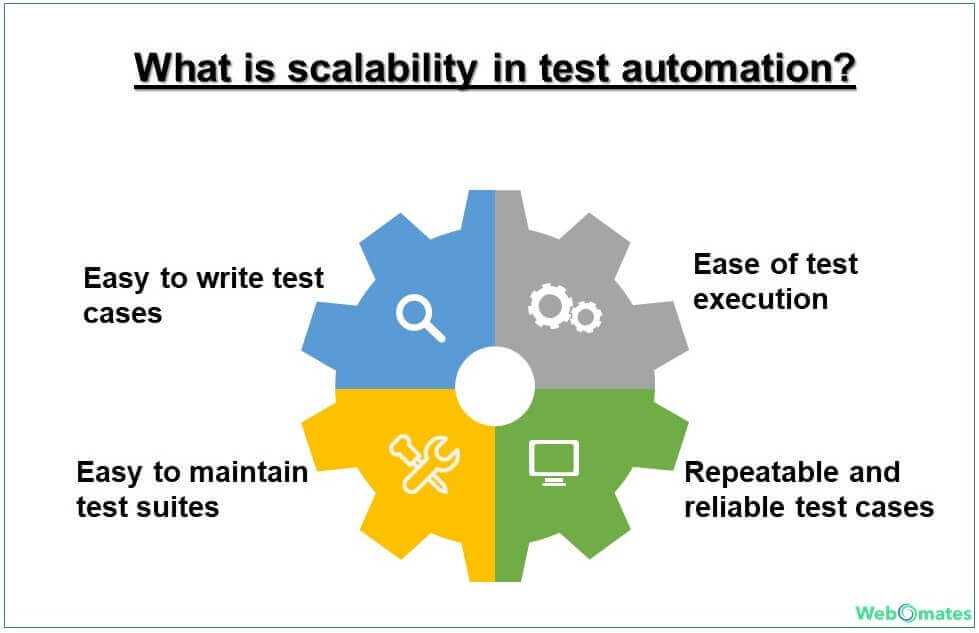
What is scalability in test automation?
Once you have identified and overcome the challenges to successfully automate your test suites, it is time to ensure that your automated testing process is scalable and can cater to the changing requirements.
Easy to write test cases Manual test case writing can be a tedious task and after a while, it gets boring and error-prone. Test automation addresses this problem to a certain extent, but if that too needs manual intervention/checking, then the whole purpose of automation gets defeated. To achieve scalability, test automation should be able to generate test case scripts and update them periodically.
Ease of test execution The test execution process has to be simple, quick and should have a fast feedback loop. It encourages quick analysis and rectification of the issues, thus making the process scalable in case there is a major change or upgrade.
Easy to maintain test suites People dread changes, especially if they lead to an extra amount of work in changing test cases to keep them in sync with the latest versions. Test automation steps in here and takes off the load. Scalability quotient depends on how easily the test scripts get updated.
Repeatable and reliable test cases What is the point of having an automated test suite if it breaks every now and then? The test cases have to be reliable and can be executed multiple times making test results trustworthy.
Achieving scalable test automation
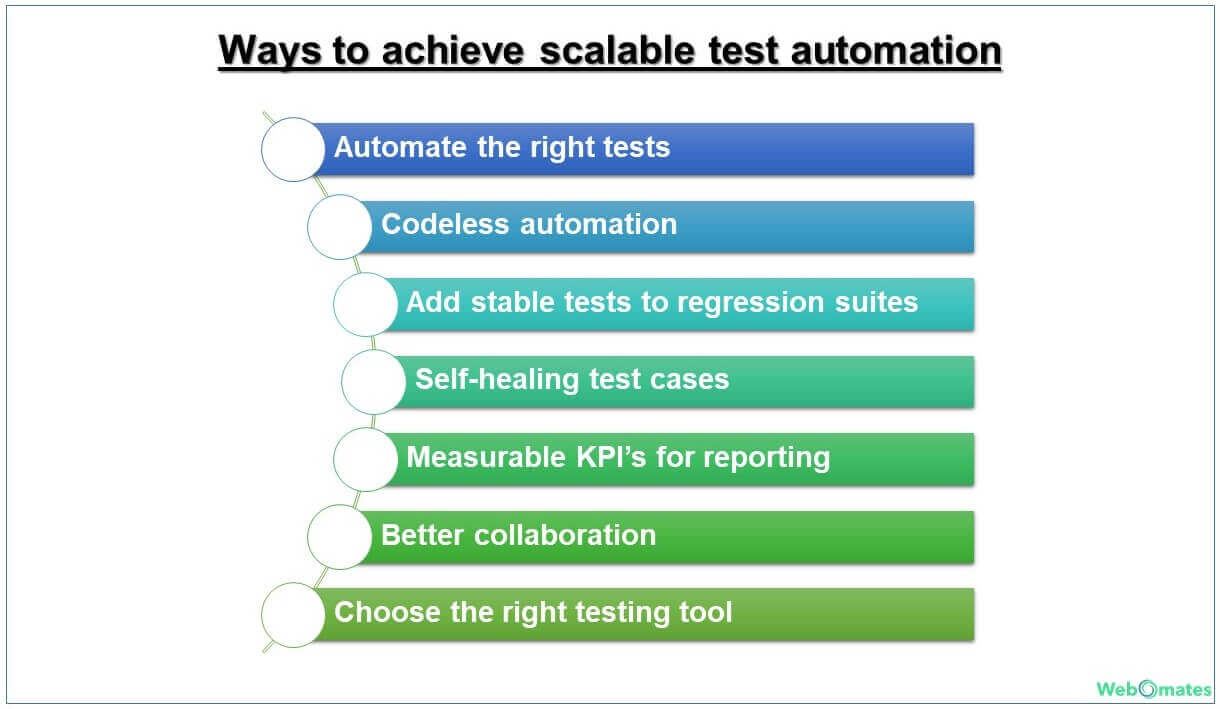
Scalable test automation is very much doable and can be achieved by following certain thumb rules, some of which are listed below.
Automate the right tests Not every test can be automated. You have to identify the right tests to automate to ensure that test automation is scalable and you get the best value out of it. Here is a quick checklist to help you in making the decision. Automate the tests that
Are repetitive and span multiple builds
Require multiple input combinations
Verify and validate critical functionalities
Are executed in different test environments and require different hardware and software configurations
Are prone to errors if performed manually
Are reusable, maintainable, and resistant to changes
Codeless test automation Now that you have identified the tests that can be automated and render scalability, won’t it be great if scriptwriting is minimal or even better, not required? This is where codeless test automation steps in. Codeless testing spurs the whole testing process by quickly generating the test cases and effortlessly addressing any modifications during testing, thus increasing the reusability and maintainability quotient of the test cases.
Defect rectification and re-testing becomes much easier with codeless testing. Test engineers can conduct multiple test runs without worrying about modifying long lines of code.
Stabilize the tests before adding them to regression suites Let the tests stabilize before adding them to your test suite if you do not wish to spend precious resources on identifying what went wrong later. It is highly likely that the tests may fail because they were not stable and reliable.
Self-healing test cases The last thing that you would want is that your application crashes because you forgot to update the test case for the minor changes in requirement or bug rectification.
Statistically speaking, approximately 20% of the test automation cost is in test script creation, and a major chunk, i.e. 80% is in test execution and test case maintenance. Clearly, it is a daunting task to keep test repositories up to date, if self-healing of test cases is not done.
That is precisely why we need a test automation tool that can understand these changes and effortlessly self-heal the tests and re-execute them within the same cycle.
Measurable KPI’s for reporting purposes How do measurable KPIs render scalability? They ensure that you get the right value of test automation by presenting tangible values in the reports. They also help in understanding whether the right test cases have been automated, which takes us to our very first point of this discussion.
Better collaboration Better collaboration and enhanced communication aids in the quicker resolution of issues and improve transparency between the teams. This consequently leads to overall process improvement since all teams are on the same page of understanding and can work towards the common goal of how to get the best ROI from test automation.
Choose the right tool Choose the right testing tool which;
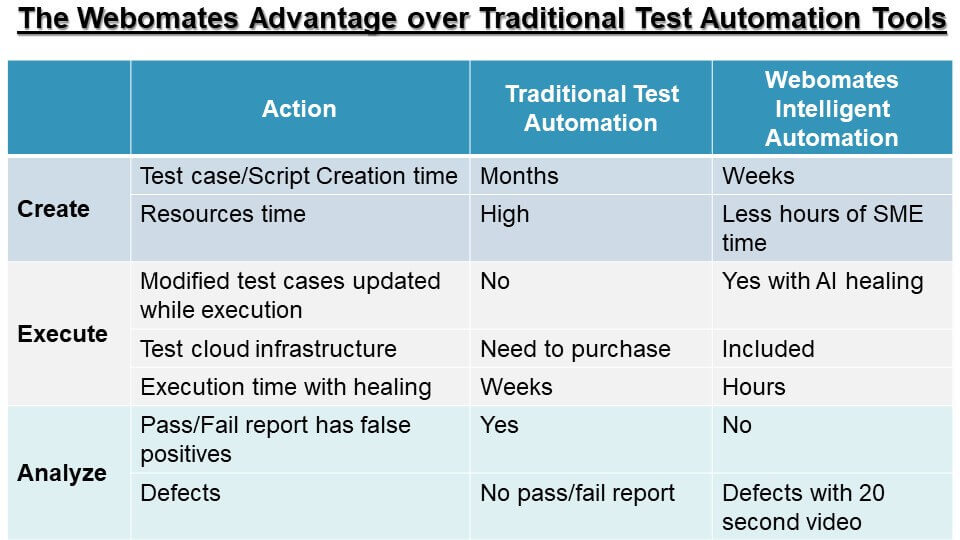
Webomates provides intelligent test automation solutions with intelligent analytics. It leverages the power of data processing, analysis, reasoning, and machine learning to provide an end-to-end testing solution for your business.
Webomates CQ has a superior test execution and test management process with the ability to scale up or down as per the customer requirement. Here is a quick reference guide for you to make an informed decision.
If you are looking for a one-stop solution for your testing needs then look no further, reach out to us at info@webomates.com.
If you liked this blog, then please like/follow us Webomates or Aseem.
Traditionally, manual testing has always been the cornerstone of quality control for software. However, it often proves to be time-consuming, error-prone, and limited in scope. These limitations become more and more evident as applications are now complex and release cycles are accelerated.
This demand for agility and efficiency led to the advent of automation, where there was an emphasis on speed, efficiency, and wider coverage.
As a result, most of the testing projects are trying to shift their focus on translating their manual test cases to automated ones to enhance efficiency, productivity, and overall testing coverage.
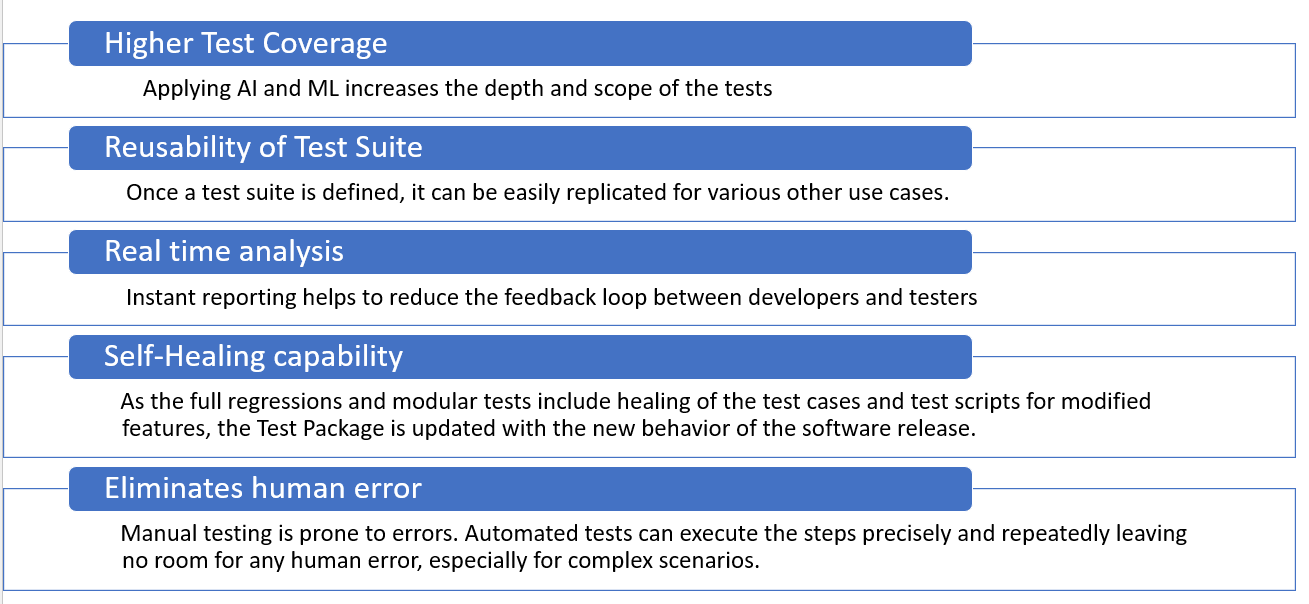
AI-powered Automated Test Case Generation results in:
Getting the test plan and test strategy right is an important step of testing and at the heart of effective testing lie test cases – they are indispensable for ensuring high quality, reliable, and user-friendly applications. We have talked in detail about “Understanding Test Plan and Test Strategy for Effective Test Automation” in our blog published last week. Click here to read more.
Now, let’s look at the key considerations in selecting the right tests to automate.
Step 1 – Identifying the right test cases
A test case is a well-defined specification of inputs, test procedures, test conditions, and expected output. They are designed to uncover defects and vulnerabilities in the application, validate the applications works as intended, and meet performance standards.
To ensure overall test coverage, you need a well-rounded set of test cases that address various aspects of the application.
For example:
Test cases to assess the overall user experience
Test cases which impact the functionality
Test cases to verify how the application handles unexpected errors and exceptions.
Test cases for verifying the interaction between different modules of the application
Test cases which may impact security and performance
But does that mean you can automate ALL tests?
Step 2 – Identifying the right test cases – TO AUTOMATE!
Now that the test cases have been identified, the next step is to execute them. That calls for the next level decision, which ones to be executed manually, and which ones to be done via automation.
The decision to automate or not should be based on various factors such as the testing objectives of the particular project, complexity, availability of skilled resources, and Return on Investment (ROI). Not all tests will meet these criteria. By carefully selecting the right tests for automation, teams can unlock a myriad of benefits, from increased efficiency and speed to enhanced test coverage and early defect detection.
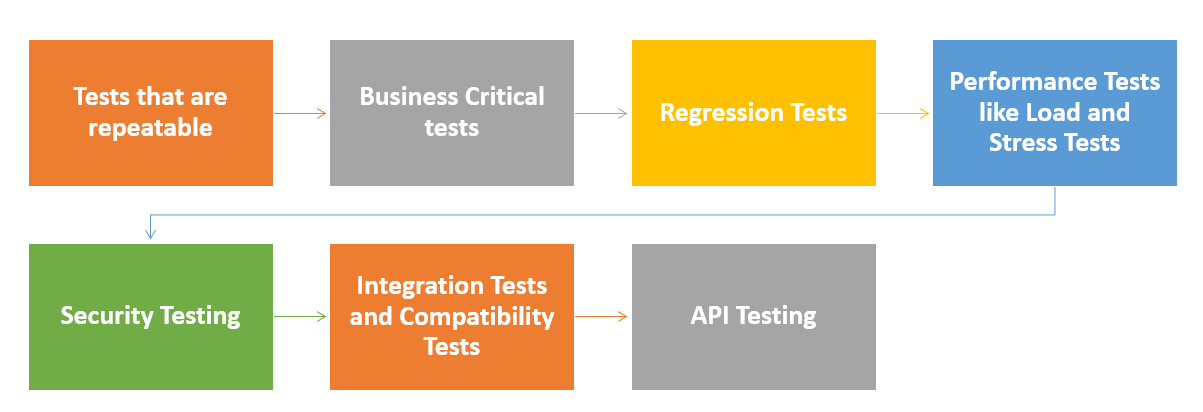
Tests that should be automated:
Tests that are repeatable – Tests that are run with each code change to ensure existing functionality remains intact.
Example: Let’s take an example of an online banking application. Automate tests for account verification or tests for repeated balance inquiries.
Business Critical tests – The features or modules that could cause damage to the business if they fail.
Example: Automate tests for complex loan approval or online bill payment scenarios involving various parameters and criteria.
Example: Automate bill payment module after each code update.
Performance Tests like Load and Stress Tests: Tests that simulate load and stress conditions on your application during heavy user traffic. Check this out to know more about the Performance Testing Types & Metrics
Example: Automate performance tests to evaluate the responsiveness of online banking services during peak hours or during tax filing months.
Example: Automate security tests to identify data security and web vulnerabilities.
Integration Tests and Compatibility Tests: Tests that verify compatibility across different browsers, devices, and operating systems.
Example: Automate tests to ensure that your banking application functions seamlessly on multiple web browsers and devices, and external systems like payment gateways.
Example: Automate API tests to validate the functionality of a banking application’s RESTful APIs for fund transfers or payments.
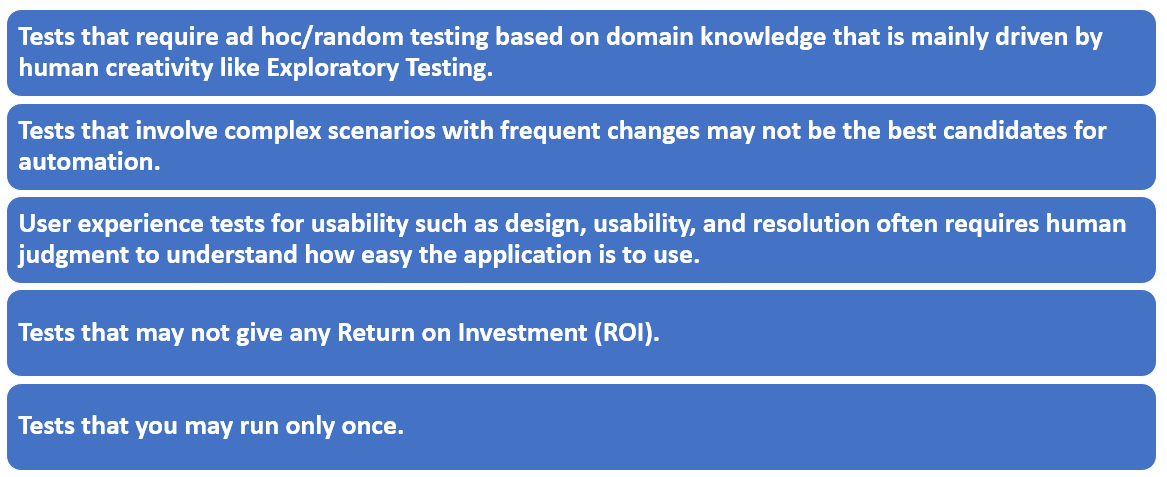
Tests that should not be automated
Though there are many benefits to automation, it’s important to recognize that not all tests are best suited for automation.
How Webomates does it
It’s the era of smart testing. And in today’s global competition, the ability to inspect the product quality comprehensively and reliably is a key success factor for organizations.
Webomates’ powerful, patented CQ Portal uses advanced AI and ML algorithms and deep learning to produce actionable results from multivariate problems.
Webomates offers regression testing as a service that is a combination of test cases based on testing and exploratory testing. Test cases based testing establishes a baseline and uses a multi-execution channel approach, to reach true pass / true fail, using AI Automation, automation, manual, and crowdsourcing.
Webomates Intelligent Test Automation helps to create test cases that are automatically generated from application models thus enabling Continuous Testing too. If you are interested in learning more about Webomates’ CQ service please click here and schedule a demo, or reach out to us at info@webomates.com