Showing posts with label #apitestingservices | #apiloadtesting | #apiautomationtestingservices #OTTPlatformTesting #apitestingserviceprovidercompanyapiautomation #webapitestingservices |#Requirementtracebilitymatrix. Show all posts

Thursday, November 3, 2022

QA Ops with Intelligent Test Automation


QA Ops is the next-level process of DevOps and is integral to the development and delivery operations. Its prime objective is to introduce quality from the onset of any project and ensure that all defined quality norms are followed throughout the development and delivery process.

QA Ops framework is the interlinking of three major processes of the development and delivery cycle — Quality Assurance, Development, and Delivery. This further implies that the concerned teams have to strive for continuous improvement to ensure that a high-quality product is delivered to the customers. Everyone involved from the conceptualization to realization of the application is accountable for maintaining the quality throughout the process.

The success of QA Ops is based on a higher level of collaboration and communication between all the stakeholders. The QA engineers need to work closely with the development team and operations team to decide on QA strategies and make sure that they are followed stringently.

In simple words, QA Ops helps in integrating continuous testing in CI/CD pipeline.

4 Key elements of QA Ops

The following diagram represents 4 key elements that need to be incorporated to embed QA in the core of operations.

  • Automation
    Automation accelerates the quality feedback loop, by creating, executing, modifying, and self-healing the test suites. Every build has to undergo functional testingperformance testing, and smoke testing, besides the customized set of tests specific for the module under test. Conducting these tests can be challenging if not conducted smartly.
    Intelligent automation can save precious man-hours and costs by fast-tracking the whole testing process.
  • Parallel testing
    Parallel testing involves executing multiple test cases on a module across various test setups in tandem, at the same time. Needless to say, these tests have to be automated for ideal parallel testing.
  • Parallel testing is important to save time and accelerate the CI/CD pipeline by identifying any flaky tests. The involvement of all the teams ensures that these tests are immediately traced back to their origin and appropriate action is taken.
  • Scalability
    Scalability aids in determining the application’s performance under varying load conditions. QA Ops requires to have a test framework and infrastructure in place to conduct scalability testing as and when required.
  • Integrating development and QA with operations
    The QA team, the development team, and the operations team need to work together to define the whole QA Ops framework. Involving all the stakeholders from the beginning ensures that clear quality processes are defined from requirement understanding to delivery. Read For More: Intelligent test automation


Wednesday, September 14, 2022

Code coverage criteria | Achieve Effortless Code Coverage

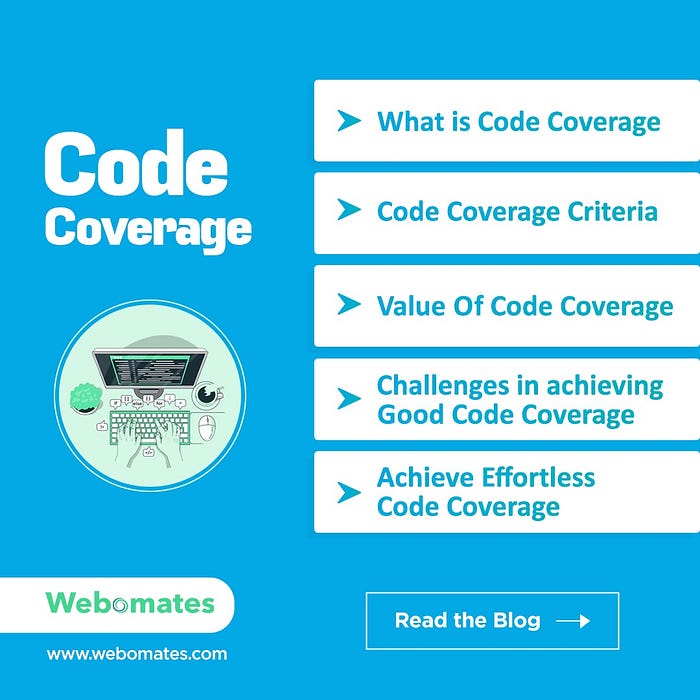
 Code coverage criteria is software testing metric that determines the number of lines of code that is validated during a test procedure, which in turn helps in analyzing how comprehensively a software product has been verified. In short, it allows organizations to evaluate their code to identify its

Photo of Code coverage criteria | Achieve Effortless Code Coverage by Webomates Inc Software testing assesses application quality. Do we need to assess testing quality as well? Yes, the test strategy, assets, and practice have distinct quality aspects. Some of the aspects that we can examine the testing quality are listed below:

Testing Scope: The depth and breadth of the application areas covered and test scenarios covered.

Relevance: Significance of the areas covered during testing and the defects found.

Efficiency: Result and test output in terms of defects as per the time spent.

Efficacy: Defects found per test effort (creation, maintenance, execution, analysis).

Drag: The time spent holding a release while it is being tested, non-tester time invested in test asset creation and review.

Reporting and Analysis: Clarity of defect reports, meaningful analysis.

This article focuses specifically on the quality of application scope. The methods we can use to assess scope are threefold:

Requirements traceability: Mapping of application features, functions, use cases, and or/scenarios to test cases.

Test artifact review: Manual review of test suites, test cases, test data, and applied judgment.

Code coverage: Automated assessment of application coverage.

These three methods are complementary and should be used together.

Code coverage has the advantage of being objective since it is provided by a computer and cannot be disputed or subject to opinion. Furthermore, the heavy lifting is done by the computer, although a little labor is required to set it up using the tools available.

So code coverage is an important mechanism for assessing one aspect of test quality. It provides several types of quantitative metrics at various application code hierarchies, as well as qualitative data — displays of annotated source code, showing lines exercised and not exercised.

What is Code Coverage

In simpler words, “Code coverage is software metrics for the number of lines, branches, and conditions of code exercised during the execution of your test suite.”

Any line of code that has not been validated is potentially a ticking time bomb waiting to go off. In a way, code coverage is a preemptive measure to find issues before the code goes to production. Additionally, code coverage is extremely vital for understanding parts of the code that are rarely executed, such as code for handling exceptional and atypical scenarios.

Good Code coverage is the result of well-defined QA Ops practices and is your safety net that prevents disasters. Inculcating good design, execution, and quality process from the onset is the way to go.

Code Coverage Criteria

There are multiple criteria used by developers and test engineers to ascertain the code coverage criteria. The most commonly used are listed below.

Function coverage: The number of functions that have been called.

Statement coverage: The number of statements that have been executed.

Branches coverage: The number of the branches of the control structures, like if-then, that have been executed.

Condition coverage: The number of Boolean sub-expression tested for a true and a false value.

Line coverage: The number of lines of source code that have been tested.

Besides these, depending on the type of product Finite State Machine coverage, transition coverage, register toggle coverage, etc. are also considered while calculating code coverage.

Value of Code Coverage

Code related

Identifies bad and dead code: Code coverage analysis points out unused legacy code which can be removed to keep the code clean. It also helps in improving coding practices by pointing out loopholes.

Helps in identifying code segment omissions: Code coverage helps in identifying the code segments which may not be executed just because the conditions were not “right”. It is imperative to test every segment to improve the quality to prevent any surprise bugs.

Test related

Early defect detection and prevention: Early defect prevention helps in managing your technical debt better. We have covered test analytics and its value in detail in our blog “Intelligent Analytics with AI-based test automation”. Read it to understand how defects discovered late in the project life cycle can create havoc.

Helps in identifying test omissions: Code coverage aids in creating new test cases to increase coverage by identifying untested code segments.

Gives a quantitative measure of code coverage: Quantitative measure of code coverage is a number that raises a red flag if not in line with the set target. It sets the wheels of analysis and damage control in motion.

Measures efficacy of test suite: Code coverage helps in analyzing how comprehensively a software is verified and how well the test suite was designed to cover all possible test scenarios. Click to know more about this article: Code coverage criteria

Friday, July 22, 2022

Top 5 Performance Testing Mistakes

Performance testing is a non-functional testing technique that exercises a system and then, measures validate, and verify the response time, stability, scalability, speed, and reliability of the system in a production-like environment. It also identifies any performance bottlenecks and potential crashes when the software is subjected to extreme testing conditions. 

Performance testing adds great value to the overall Quality Assurance process of any organization. However, if not planned and executed properly, it can also lead to issues later after software delivery. In this article, we will take a look at some of the mistakes that testers commit while doing a performance test on a software.

Not defining Key Performance Indicators properly

kpis

Every system has certain Key Performance Indicators (KPI’s) or metrics that are evaluated against the baseline during Performance testing. For example, if the expected response time of a system is 1 second and it is taking extra milliseconds, then it indicates an issue that needs to be addressed. 

Ideally, KPI’s should be identified and defined before testing commences.

Scheduling Performance testing at end of development and test cycle

There is a misconception that it is good to test the software as a whole for performance. This leads to placing performance testing at the end of the development cycle. This is a serious fault in the testing process. With shorter delivery cycles, it is prudent to check every deliverable, however small, for performance. Integrating performance tests in the continuous testing process is a great way of ensuring that every deliverable is tested well for functionality as well as performance.

Incorrect Workload Model

web-hosting

Workload deals with concurrent usage of the software. It includes the total number of users, concurrent active users, data volumes, and volume of transactions per user, etc. For performance testing, the workload model has to be defined keeping in mind various possible scenarios. If the workload model is defined erroneously, then it directly impacts the testing process. The testing team should work closely with stakeholders to understand the realistic scenarios of usage and plan the workload model accordingly. The workload model should be tweaked and modified to reflect any changes in the software. It should also encompass peak hour usage scenarios and network congestion scenarios.

Failure to create a realistic test environment

A software could pass all the tests with flying colors but may get stumped in a real usage environment. This could be the result of a failure in simulating a realistic test environment. In reality, there are multiple components that interact with the software, like servers, 3rd party tools, a variety of hardware and software, etc. If all these factors are not taken into consideration while designing a test plan, then there are high chances that the software’s performance is low when launched in the real world. For example, if there are multiple transactions by multiple users at the same time and network bandwidth and CPU performance are not taken into consideration, then the software will slow down significantly. Hence, it is highly recommended to create a test environment that closely emulates the environment in which the software will eventually function, keeping in mind all possible load scenarios. 

Ignoring system errors

System errors are indicators of underlying issues. For example, erratic browser errors may seem insignificant and may not be replicated every time. In another instance, there are times when the response time for software is perfect under load conditions but there could be a stack overflow error that occurs randomly. But, every error has to be investigated for any potential issue. Ignoring such errors due to non-replication while running multiple tests leaves a gaping hole in the whole testing exercise.

Conclusion

Performance testing reports and analyses aid the stakeholders to understand the functioning and performance of the product in a real-life scenario. They can accordingly make strategic business decisions on improvements before it is launched in the market. Therefore, it is imperative to consider all possible testing aspects and avoid the above-mentioned mistakes while planning for software testing.

Webomates has optimized testing by combining our patented multi-channel functional testing with performance testing where the same functional tests can be used for load testing. The user just needs to define the following performance parameters:

  • Number of concurrent virtual users
  • Duration of load
  • Expected execution time

These parameters can be defined at the suite level or individual test case level. Once parameters are set, the functional test is enabled for server-side performance verification with a single click.

Click to read more of this article: Agile vs DevOpsIntelligent Automation, Requirements Traceability Matrix, API Testing

Sunday, June 26, 2022

Regression Testing & Its Importance

If you are a fan of the Ice Age animated movie series, you might recognize this scene. In this scene, Scrat (the squirrel) is holding on to an acorn and trying to close one of the leaks from the iceberg. But that results in another leaking point elsewhere and when he tries to cover that leak, it results in another one with a cascading effect. Similarly, if we draw a parallel in the world of software development, there are times when fixing one bug might result in another bug(s) unintentionally. This is further compounded by the agile team, teams creating modifications and new features and releasing them continuously, which can introduce even more bugs. Regression testing plays a crucial role in getting a stable version of the software by taking care of finding such bugs before production deployment.


What is regression testing all about?

Regression testing is a type of software testing technique where the QA team runs a set of test cases to verify that with bug fixes or with the addition of new features in the application, the previous functionalities are not hampered. 

In the agile methodology of software development, there are incremental changes and the frequency of lines of code change is high. Hence, there is a high probability of new bugs getting introduced. This leads to the need for regression testing to become an integral part of the software development life cycle. Regression testing becomes even more important when the application is live and being used by the end-user and their reported issues are to be fixed on the highest priority. (Ai test automation tools)

After the software is made available to the end-user, especially during the beta testing phase, development teams do not have any control over the environment and the actions, that the end-users will perform while using the application. Those actions are the real-time, real-world actions as to how the application is intended to be used and this phase of testing brings in the most valuable feedback about the application. The feedback report might have bugs or errors which need to be fixed in order to achieve a version that can be released to the end-user for actual use.

Regression testing ensures the stability and quality of the release.
 

Let’s talk about types of Regression testing

Regression testing can be done on various scales, depending on the requirements of the application and the organizational structure. This invariably requires taking into consideration the cost and the manual efforts involved. Based on the current requirement of the project, one can go with either complete regression or partial regression.

  • Complete regression involves going through the entire application or website once again to make sure that all the functional areas are working as expected and none of the current functionalities is hampered. This can either be done manually or can be automated as well. For the automation, there are various frameworks available in the market like Selenium or Capybara using which the software testers can automate their regression suite so that whenever this needs to be done before an important release, it can be done swiftly and quickly covering all the major areas of the application. This is a time-saving option when looking for complete regression. However, this requires a lot of upfront effort and almost continuous maintenance or you can use Webomates CQ.
  • For more informationRegression Testing  

    Regression Testing

    Regression Testing

Monday, April 11, 2022

The choices you make define testing efficacy

 Would you be willing to pay more for the last-minute execution of plans just because you didn’t chalk out a few details in advance? It hurts to shell out extra for something that could have been easily well planned in advance. Planning is an indispensable part of our daily lives. The same is applicable when it comes to software development and testing. Planning is the first step forward and selecting the right approach makes all the difference. (what is manual testing)

Testing is an integral part of software development and planning it well is half the battle won. The same is deemed true for test case designing and execution, which are the founding stones of software testing.

A test case is a well-defined specification of inputs, test procedure, test conditions, and expected output. 

Every test case maps to a business requirement and every requirement can have multiple test cases corresponding to it. The more complex the requirement, the higher is the number of test cases corresponding to it. But, is it mandatory to execute every single test case designed to test a functionality? Not really!! The key is to find the right ones, especially when the time is of the essence and resources are scarce or limited

Test case prioritization

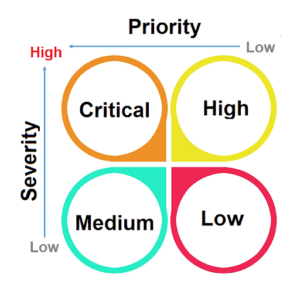
The pace at which development is done in the agile methodology, testers are usually left with a limited amount of time in the sprint to go through an entire round of testing. It calls for choosing and executing the right test cases to conduct and effective testing. To that effect, the testing team needs to employ a proper test execution strategy based on two key parameters – severity and priority

Priority is essentially the order in which defect should be fixed and deals with scheduling.

Severity is the degree of impact on the functionality of the end product.

The following diagram represents defect severity and priority as the two key parameters. Based on the weightage of priority and severity, the right test cases are identified and marked for execution.

Test case prioritization
Test caseExplanationExample
CriticalThe test cases that need to be executed first are the ones attached to high priority and high severity.User’s inability to log in to a system. 
Everything stands still if a user cannot log in thus making it critical to fix it first.
HighThese are test cases with low priority but with high severity. “Change Password” link in the application not working properly.
This is a rarely used feature so the low frequency of accessing this link makes a low priority.But a functionality not working makes it a high severity.
MediumMedium level test cases determine that the crucial information available on the product is correctly conveyed.Incorrect logo/spellings of an organization on every page of a website.
This is a high priority because it is a showcase of the website. However, it is not impacting any functionality thus ranking lower on the severity meter.
LowThese test cases will not impact the functionality or the quality of the product to be released and need not necessarily be executed in case of a time crunch.Minor UI mistakes like color and font.

Identifying the right test cases and test approach

Identifying the right test cases and test approach

Multiple test cases can correspond to a single requirement, resulting in a big test case repository. Picking which ones to execute, at what stage, is a herculean task. 

Test scripts contain multiple steps sometimes running into many lines of code. A prudent and wise approach is to adopt modularity from the beginning itself. It helps in executing specific sections/ test modules, instead of a large script. 

Also, it is important to check whether all the identified test cases should be executed or just a subset needs to be considered. It largely depends on the stage at which the testing is being conducted.

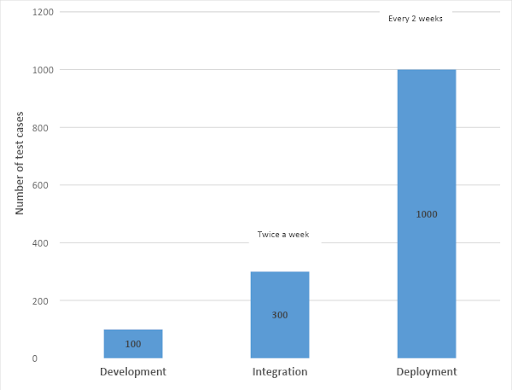
The following figure shows the number of test cases that should be ideally executed depending on the stage of development. 

Assuming, Timeline for production = 2 weeks and Number of test cases = 1000

Note: These are indicative numbers and can vary based on the application under test.

graph

At the development stage, execute at least 100 automated test cases for the affected code, several times a day.  

At the integration stage, which may happen maybe twice or thrice a week, approximately 300 test cases may be executed. It is a good idea to consider cases impacting the security posture and overall performance. At this stage, using a healthy mix of manual testing and automated test cases is a preferred approach.

At deployment, a complete regression testing cycle should be conducted with all the testcases, 1000 test cases in this example.

 Needless to say, when the timeline is tight, then pick up the critical and high-impact test cases. For more information: Manual Testing

Tuesday, April 5, 2022

Exploratory Testing: The Voyage To Find Undiscovered Bugs


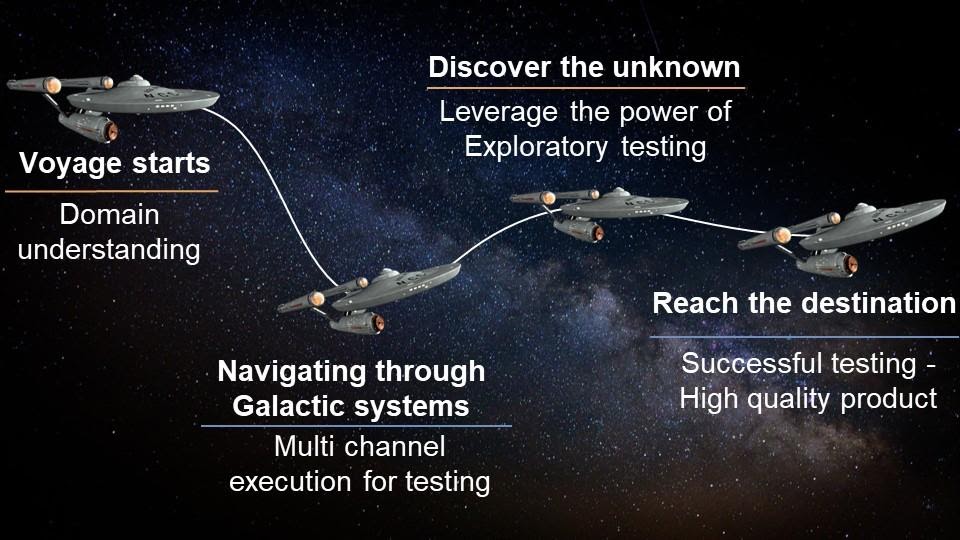
Software testing – The final frontier, in the voyage of software development

The journey of software development is riddled with various quests, a few unknown territories, multiple surprises, but a well-chartered course of action at the beginning helps in conquering all that comes your way.

Software testing is the final frontier in the voyage of software development. Smart test planning at the outset of any project helps in netting most of the potential issues. However, there might be some unexpected and unknown errors that may escape the net. But as Captain James T. Kirk would say “There’s no such thing as the Unknown, only things temporarily hidden.”

software

This is where exploratory testing comes to the rescue.

Exploratory testing in software testing is a hands-on approach of testing that involves learning by discovery, test schematizing based on learning, and test execution. It helps in discovering new bugs and uncovering hidden segments of code that may be harboring a dormant bug. Including exploratory testing as part of the test planning may prevent unexpected issues at the time of deployment.

This article takes you through the voyage of software testing and will help you understand the importance of exploratory testing.

exploratory-testing

Domain understanding is one of the most obvious criteria before the commencement of test planning. You would not want to embark on a journey without getting basic facts and parameters right.

fact-1

Get domain experts on board along with business and technical teams. Their expertise will help you in charting the path for your voyage. You can go through our earlier analysis on what all skills are required to be a “good” explorer aka exploratory tester, by clicking here

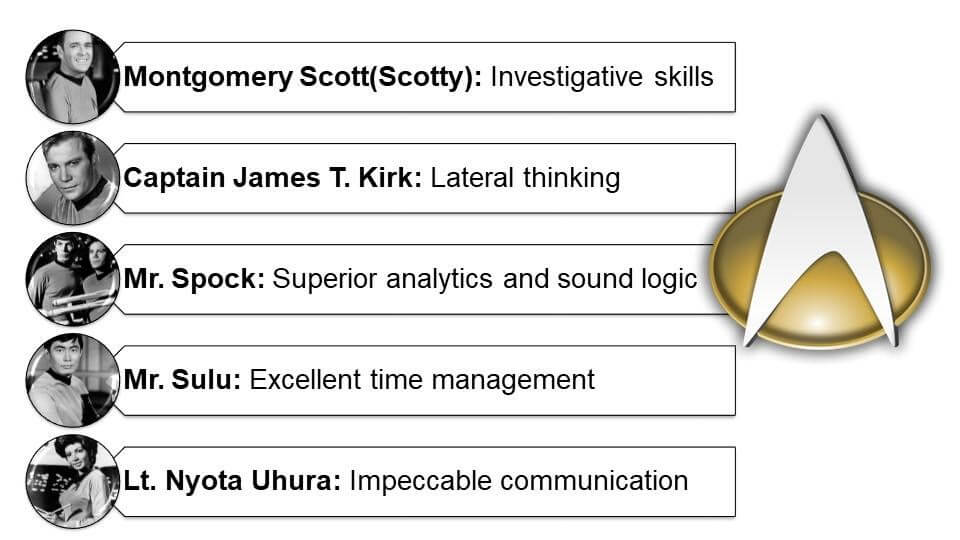
Here is a quick recap in case you are in a rush. A good explorer crew needs to have the collective abilities of:

Explorer

Navigating through the different galactic systems of testing

Once your testing crew is in order, the journey through the stars becomes easier to navigate. A voyager encounters many star systems and the approach to traverse through them may not be common. It will all depend on the kind of galactic system that is being navigated. Similarly, multiple approaches can be taken to have good test coverage. However, multi-channel execution has a clear advantage when it comes to good test coverage. It involves,

But is this enough? In all likelihood, a bug might take you by surprise and hit your ship, hurtling you off the course. And that is precisely why exploratory testing is needed, to eliminate the surprises.

Exploratory testing: Discover the unknown (or hidden)

During exploratory testing, your testing crew will need to explore the application and learn about its functionalities by discovery and learning method. However, they have to adhere to the exploratory charter that has goals and boundaries for testing defined.

fact-2

Honing all your exploratory skills and exploring the unknown and finding what is hidden is a big challenge, but it can be done. 

Exploratory testing gives an extra edge to software testing by complementing scripted testing by venturing into potentially high-risk segments. Read for more : Exploratory Testing

If you are interested in learning more about Webomates’ CQ service please click here and schedule a demo, or reach out to us at info@webomates.com.

AI Testing Services: Understanding Defect Leakage in Software Testing

  In today's fast-paced software development environment, organizations are under constant pressure to deliver high-quality applications...